

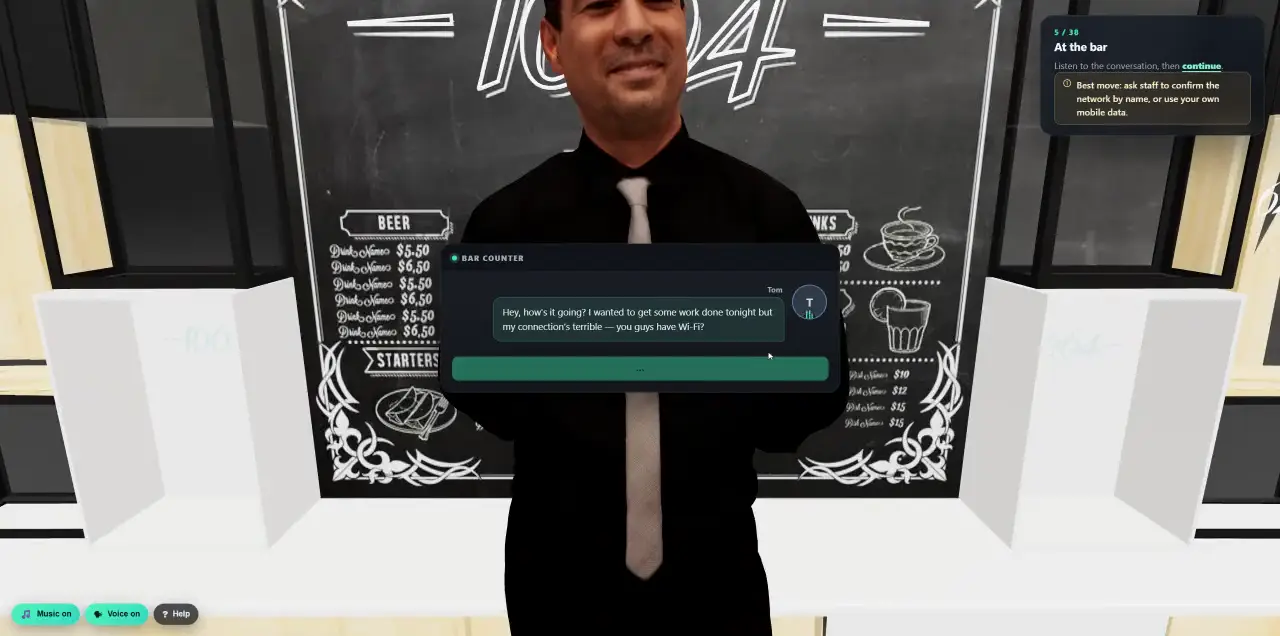
 Walk into a 3D lesson.Watch a learner go through the bar scenario, step by step.
- Platform
- Annual Awareness Programs
A year of security awareness. Described in one sentence.
Tell Cyberfrog AI what you need, or click through six short steps. Either way you get a complete 12-month programme of lessons and practice, tailored to your teams, tested in a sandbox and mapped to your frameworks, before anyone receives a thing.
- Ready in minutes
- 12 months of lessons and practice
- Tested in a sandbox first
- NIS2, ISO 27001 and DORA evidence
Ask, pick or start from scratch.
Every ready-made programme brings the same core lessons and one 12-month plan for exactly the people you select. You decide how much it is tailored.
- 01Ask Cyberfrog AI
Describe your company, your teams and what you need to prove. Cyberfrog AI builds the draft programme and validates it. You review and approve; it never sends anything on its own.
- 02Core, Enhanced or Regulated
One shared programme, practice tailored to teams, or a regulated year with a leadership briefing and a contractor path. Each comes with sensible defaults you can change.
- 03Start blank
An empty calendar for teams that already know exactly what they want. Add your own people, lessons and simulations step by step.
Six steps. A whole year.
Clicking through takes a few minutes, and every screen shows what the choice changes. At the end you get a draft. Nobody is contacted yet.
- Programme
Core, Enhanced, Regulated or blank. Core lessons cover topics such as workplace policies, reporting an incident, spotting phishing, passwords and sign-in, remote work and handling company data.
- People
Tick your recipient groups and see the live count, how many have a work phone, and their languages. Mark who approves payments; they get “Verify before you pay”.
- Teams
Executives, Finance, HR, IT, customer-facing teams and contractors each get practice written for their job.
- Year plan
Core 4, Enhanced 6 or Regulated 8 practice emails a year, one step fewer or more if you like, and the result per group, for example “Everyone 4 · Finance 5 · Finance + Executives 6”. Easy to hard, text and voice messages for people with a work phone at the 12-a-year pace, each person’s own language, and what happens after a failed simulation.
- Delivery
Start date, timezone, sender, and the simulation domains: the best match per scenario, one for all, or one each.
- Review
One summary of who, what and when. “Create the draft” puts the year on the calendar and in the journey builder.
- Lessons in 3D and video
- Your own policies
- Each person’s language
Practice written for each job.
Finance gets the fake invoice, HR the poisoned job application, IT the urgent admin alert. Each team you define gets practice emails written for its work: two of the shared ones are swapped for team versions, plus one extra team-only email. The lessons stay the same for everyone.
- Teams
- Executives, Finance (with payment approvers), HR, IT and engineering, and customer-facing teams. The regulated programme adds a contractor path.
- Fair
- At most two extra emails per person, however many teams they are in, never more than 12 a year, and always at least three weeks apart.
- Leaders
- The regulated programme adds a leadership briefing for your management group.
- Joiners
- Optionally include people who joined in the last 90 days.
A year that reacts to people.
The draft opens in the journey builder: training and simulations on a 12-month timeline, one lane per group. Drag in new steps and decide what happens next for the people who pass, fail or fail again.
- Steps
- Email, web, SMS, live AI voice call, deepfake video and cloud-share simulations, awareness training, conditions, delays, approvals, automations and report checkpoints.
- Branches
- Passed, failed, failed again, high risk, approved, rejected or timed out. Everyone else simply continues.
- Conditions
- Completion, quiz score, simulation outcome, group membership, time elapsed, approval status and risk score.
- Automations
- Notify the manager, add a tag, change someone’s frequency or assign retraining.
- First fail
One short course, built from that exact scenario.
- Failed again
The intensive phishing lesson in 3D, once per person.
- Only real failures count
A plain link click is not a failure. Submitting credentials is.
- Everyone else
Carries on with the year, without extra noise.
Rehearsed before anyone gets an email.
Every programme goes from draft to production in five visible stages. The sandbox runs the whole year with simulated passes and fails, so every branch is exercised. It never emails or calls real people. Production does.
- Draft
- Validate
- Sandbox test
- Publish
- Production
- Validation
- Missing content, unreachable or looping steps, schedule and timezone, approvers, follow-up courses still being generated, and compliance gaps you marked as mandatory.
- Publish
- Only after a completed sandbox run of exactly this version.
- Versions
- Publishing keeps the live version and opens a new draft for changes. Every step is in the audit log.
- Running
- Pause, resume or cancel at any time, and see participants, completions, failures and the next scheduled steps.
Coverage you can show an auditor.
Pick the frameworks you answer to and Cyberfrog checks the programme’s topics against their awareness controls, mandatory and recommended. Close a gap with one lesson, then export the evidence.
- Frameworks
- NIS2, ISO/IEC 27001:2022, DORA, NIST CSF 2.0, CIS Controls v8.1, PCI DSS v4.0.1 and the HIPAA Security Rule.
- Gate
- Optionally block publishing while a mandatory topic is missing.
- Evidence
- CSV and JSON exports with mapped topics, audience snapshots and completions.
Coverage supports your evidence. It does not certify your organisation; confirm applicability with your auditor.
Less noise, more practice where it counts.
The defaults come from what works: training and practice balanced across the year, and extra help only for the people who need it.
- Lesson first, then practice
The year opens with your policies lesson, then the first practice email.
- Realism, not volume
Difficulty changes how convincing the simulations are, not how often they arrive.
- Each person’s language
Lessons and emails go out in each person’s own language when available, with a fallback.
- Payment approvers
People who can approve payments or change bank details get “Verify before you pay”.
- High risk, handled
Branch people with a high risk score into extra practice, or build a group from the riskiest people.
- Managers in the loop
An automation can notify the manager after repeated failures, and approvals pause the year until someone decides.
Everything a year needs, in one place.
- ContentThe training library
3D lessons, videos and courses ready to drop into any month.
See the library - PracticeAI-powered attacks
Add live AI calls, deepfakes and multi-stage conversations to the year.
See AI attacks - AdaptAdaptive risk campaigns
Add a personal path on top of the planned year, driven by what each person does.
See adaptive campaigns
Plan next year in the demo.
Tell us about your company and we build your first annual programme together, in 30 minutes.