

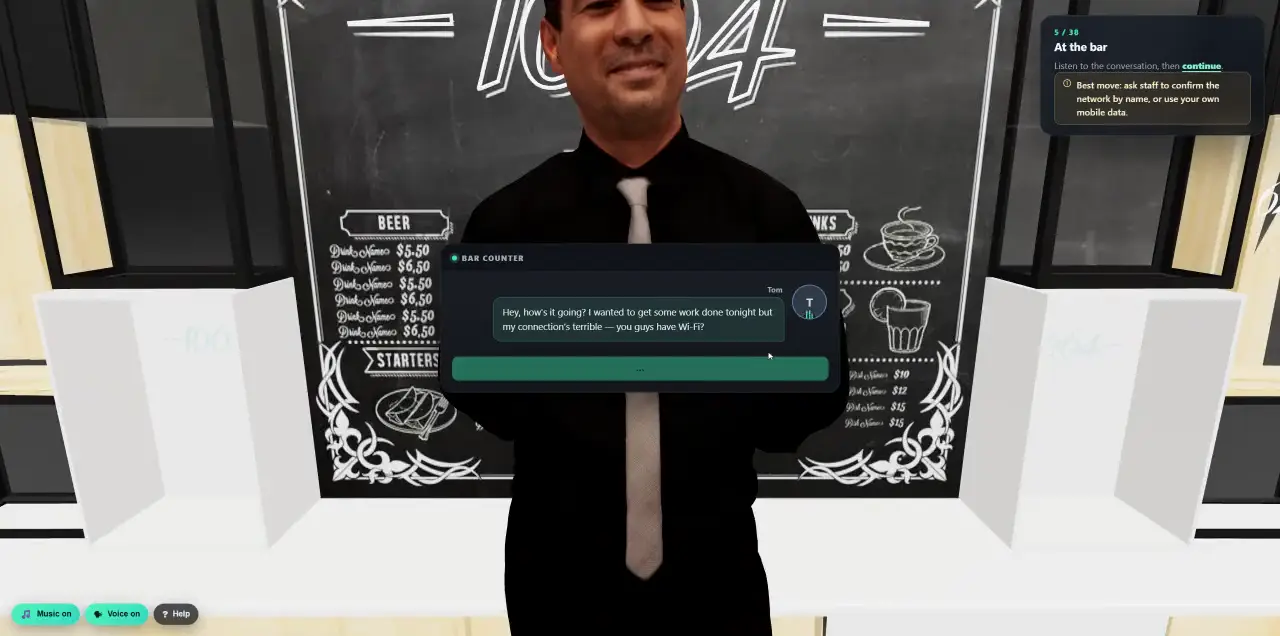
 Walk into a 3D lesson.Watch a learner go through the bar scenario, step by step.
- Platform
- Learner Portal
A portal where every employee sees their own progress.
A portal in your branding where people find their lessons, see their results, collect badges and follow a Security Fitness score that rewards good habits instead of shaming mistakes. Managers see their team, in aggregate.
- Single sign-on or a one-time link
- In 130+ languages
- A score that never shames
- Privacy-first manager view
Everything to do, in one place.
No hunting through old emails for a training link. The portal shows what is assigned, what is due, and lets people continue a lesson exactly where they stopped.
- Assigned
- Lessons, videos and 3D scenarios with progress and due dates. The open count sits right on the tab.
- Completed
- Every finished lesson with its quiz result or confirmation, and the date.
- Results
- A timeline of the simulations someone received, and what they did, explained in plain words.
- Resources
- Short guides you publish: how to spot a suspicious message, how to report, password basics.
A score that rewards good habits.
Every employee gets one number from 0 to 100, built only from what they did well. It never punishes missing data and it explains itself, so people know exactly how to raise it.
- Explained
- “What makes up your score” shows each part, its weight and its value.
- Trend
- A line over time, so improvement is visible.
- Next steps
- Two or three concrete things that would raise it.
- Compare
- Optionally against the company median, only where enough people are included.
- Training, 35%
Assigned lessons completed.
- Resilience, 30%
Simulations reported or ignored rather than clicked.
- Reporting, 20%
Suspicious messages reported, real or simulated.
- Engagement, 15%
Recent activity, goals and badges. Your admin can change the weights.
Progress people want to see.
Small wins keep awareness going between campaigns. Badges mark the moments that matter, goals give each quarter a target, leaderboards add a little friendly competition and certificates prove what was completed.
- First course complete
- All training done
- First report
- Phish spotter
- Resilient
- Badges
- Earned and locked badges with the date they were won. A new badge appears on the overview and arrives by email.
- Goals
- Targets such as “finish all assigned training this quarter” or “report three suspicious emails”, with points and progress.
- Leaderboards
- Optional, by team or company, with named, anonymous or private modes so nobody is shamed.
- Certificates
- A downloadable certificate for every completed course, for the learner and for your auditor.
- Yours to shape
- Edit the starter badges, add your own, and switch any part of the portal off.
Every report gets an answer.
An email, a strange call, a text message: people report it in a few clicks and see what happened to it. Well spotted, it was a simulation. Real phishing, we blocked it. Or: our team is checking.
- Simple
- Pick what happened and describe it in your own words.
- Answered
- Your security team gives each report a verdict, and the reporter sees it in “Your reports”.
- Rewarded
- Reports count towards Security Fitness, and the first one earns a badge.
Prefer the inbox? The Report Phishing button for Outlook and Gmail feeds the same history and score.
Phishing reporting and SOCSee the team. Not the mistakes.
Managers get a “My team” page with totals and trends, and a button to nudge people with open training. Who clicked which simulation stays private.
- 01The right team, automatically
Teams come from your directory’s manager field, a group, a list or a rule, and stay in sync as people move.
- 02Private by default
Totals only. Individual simulation results are hidden, comparisons need at least five people, and exports are off unless you allow them.
- 03A friendly nudge
One click reminds the people who still have open training. No names called out.
Live in an afternoon.
Switch the portal on for your workspace, decide who gets in, and it is ready, in your branding.
- Sign in your way
Single sign-on with Microsoft, Google or any SAML or OIDC provider, or a one-time link sent to the work email. No new password to remember.
- In their language
The portal, its lessons and its emails in each person’s own language, 130+ to choose from.
- Who gets in
Everyone, people with assignments, chosen groups, a list or a rule. Self-registration for approved email domains.
- Your address
Your own domain, a subdomain, or a path on Cyberfrog, resolved automatically.
- Your look, any device
Your logo and colours in the portal and every email it sends, on a laptop or a phone.
- Only what you want
Turn any part on or off: results, score, comparisons, badges, goals, resources, reporting, exposure, the manager view.
- See what they see
Admins preview the portal as any employee, read-only, before switching it on.
- Emails that bring people back
Assignment, due and overdue reminders, completions, new badges, report feedback and a summary for managers.
- Their own exposure
Optionally, people see if their work email appeared in a breach and what to do, without ever seeing a password.
One place for everything people do.
See the portal through your employees’ eyes.
In a 30-minute demo we open the portal in your branding and walk through a year from the learner’s side.