

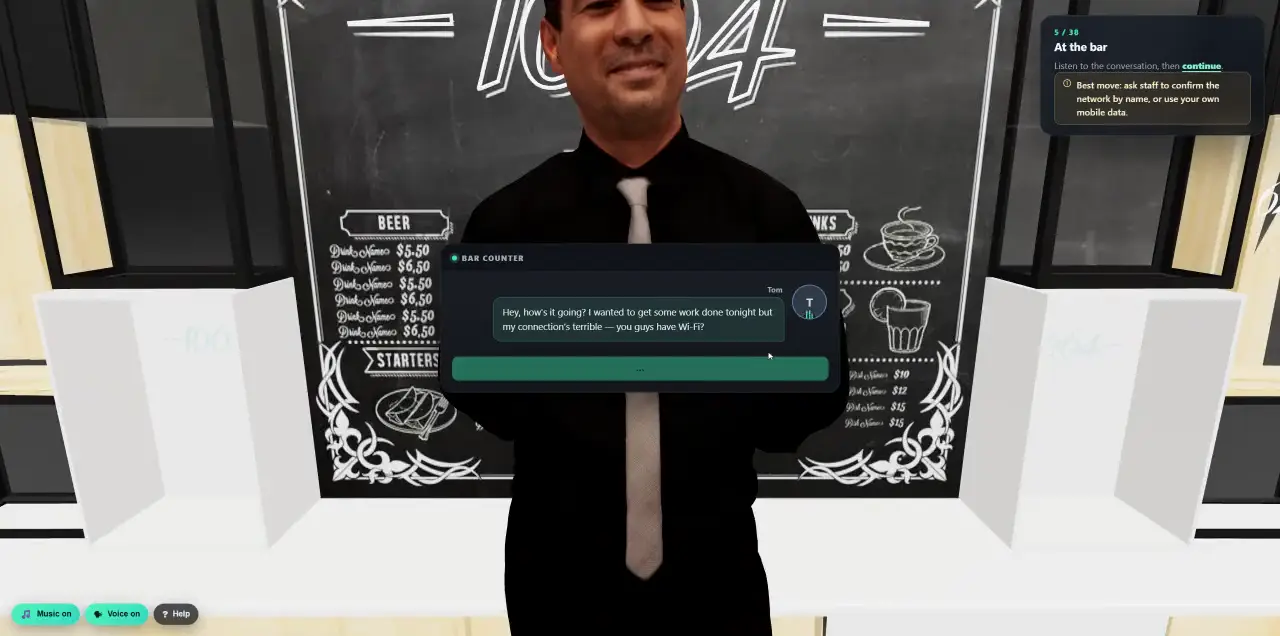
 Walk into a 3D lesson.Watch a learner go through the bar scenario, step by step.
- Platform
- AI Content Studio
One AI prompt.
Every training format.
Describe a topic, or hand over a policy or a real incident. The Studio writes the course, the video, the poster and the email, in your branding and in the language your people speak.
- Courses with graded quizzes
- Narrated videos with subtitles
- Print-ready posters
- Courses and posters in 130+ languages
A complete course from a prompt, or from your own policy.
Write what people should learn, or upload a policy, handbook or playbook and the course is built from it. Eight guided steps, or Autopilot: give a topic and the Studio decides the rest.
- Source
- A prompt, or your own documents (PDF, DOCX, TXT, MD or CSV, up to 10 MB).
- Outline
- Review and edit the outline before anything is written. Up to 30 slides.
- Audience
- Executives, IT admins, developers, finance, HR, remote workers and more, tuned further with modifiers such as Microsoft 365 or regulated industry.
- Look
- Nine design styles, ten colour schemes, six fonts and your logo on the cover. Optional AI illustrations in 18 styles.
- Languages
- 130+ languages. Courses are written directly in the language you choose, and AI translation adds any other.
- Quiz
- Single choice, multiple choice and true/false, each with an explanation. You set the passing score.
- Afterwards
- Edit with AI or by hand, every change saved as a new version. Export as SCORM 1.2 or an HTML archive.
A short film, not a slideshow.
Describe the topic and Cyberfrog writes a scene-by-scene storyboard, then renders a film in which environment, visual style and presenter stay the same from the first scene to the last.
- The look
- Four environments, four visual styles, and a recurring character or none at all.
- Storyboard
- Up to six scenes of 4, 6 or 8 seconds. Edit, add and reorder scenes, regenerate a preview frame or upload your own image.
- Voice
- AI narration in 10 languages with six voice characters you can preview. Subtitles as an .srt file, optional background music.
- Branding
- Company name, primary colour, intro and outro cards, call to action and watermark.
- Brief
Topic, tone and audience, or Autopilot with just a topic.
- Storyboard
Read the scenes and preview frames, then adjust what you like.
- Look and voice
Presenter, narration, subtitles, music and branding.
- Render
Standard quality takes about one to three minutes. Every render is kept, so you can roll back to any version.
Posters people actually read.
Pick a headline from five AI proposals, get a text-free illustration, and the Studio sets your real text on top. Because the words are live text, not part of the picture, they stay sharp on the office printer and on screen.
- Topic
Pick the language and a tone: Serious, Fear and Action, Humor, Statistics, Challenge or Informative. Paste source material if you have it.
- Message
Let the AI propose five options, then edit the headline, subhead, up to three bullets and the call to action.
- Format
A4 or A3, portrait or landscape, for the printer. Square, story and wide formats for screens. Three layouts: stacked, hero band or split panel.
- Illustration
Artwork without any text baked in, in your colour scheme or a brand colour of your own.
- Branding
Your company name and logo as PNG, SVG or WebP.
- Review
Edit copy and design, regenerate only the illustration, or translate the poster into another language.
- PNG for screens
- Print PDF, A4 and A3
- 3 mm bleed
Emails written on the canvas, personal for each person.
One composer serves training emails and attack simulations. Type straight onto the canvas, insert blocks, and preview before anything is sent.
- Text
- Image or logo
- Button
- Alert box
- Signature
- Divider
- Spacer
- Layouts
- One, two or three columns, sidebars, header and footer.
- Variables
- First and last name, company, dates with offsets such as three days from now, and the tracked link.
- Preview
- Desktop and mobile, preview as the recipient, send a test, or edit the raw HTML.
- With AI
- Describe the email, or upload a screenshot of a real phishing email and get an editable template. Translate or shorten in one step.
- Training email
- Turn a whole course into one self-contained email, in Magazine, Journey, Executive briefing, Story timeline, Split screen or Dashboard layout.
From a real incident to a lesson, the same day.
Someone reports a suspicious email. Upload the evidence and Cyberfrog turns it into a branded story lesson with a quiz, so everyone learns from what really reached your company.
- 01Upload the evidence
Screenshots, raw .eml files or text notes: phishing emails, SMS, QR codes, fake logins, chat messages, ransomware notes. Several pieces about one incident combine into a single lesson. Text is read with OCR and an AI vision fallback.
- 02Shape the lesson
Choose the tone, from Urgent to Empathetic, how technical it should be, your logo and colour, an optional quiz and any of 130+ languages. The lesson walks through The Incident, Spot the Signs, What You Should Do and Key Takeaways.
- 03Publish where people are
As a web lesson, an email warning, a short video, an intranet widget or a microsite. Share it by tracked link, in an email campaign or as a Slack or Teams alert.
One library. Every format, every language.
Everything the Studio creates lands in one searchable library, next to a starter library from the Cyberfrog team, so nobody starts from a blank page.
- Find
- Filter by type, status, category, language, creator and source: AI created, upload, incident, OSINT generated or manual.
- Types
- Web based, email, video, 3D, incident and poster training. Attack templates sit in their own table.
- Languages
- Language versions of a template are grouped in one row, with a translate action for posters, emails and incident lessons.
- Versions
- Every edit creates a new version, so a change never overwrites what ran last quarter.
- Starter library
- Ready-made courses and attack templates, shared read-only. Edit one and you get your own copy.
Use a template in any campaign or annual programme. The content is built once and reused everywhere.
More than the six builders.
Smaller capabilities that save time once you work with the Studio every week.
- Autopilot
Give a topic and the Studio chooses structure, length and design for a course or a video.
- Interactive 3D lessons
Describe a scenario, review the storyboard, then generate and revise an interactive 3D lesson.
- News-driven training
Turn a current threat in the news into a lesson while it is still relevant.
- Edit with AI
Shorten, simplify or change the tone of one slide or a whole course. Prefer to type? Manual edits use no AI credits.
- SCORM export
SCORM 1.2 packages for your LMS: web courses, plus a launcher for videos and 3D lessons.
- Usage and spend control
AI generation is metered per customer, with spend limits so costs stay predictable.
Content is only the start. Put it to work.
- SimulateAttack simulation suite
Follow an attack with the lesson you just made, automatically, for the people who took the bait.
See the attacks - ScheduleAnnual awareness programs
Drop courses, videos and posters into a year plan that runs itself.
See programs - ProveAnalytics and reporting
Quiz scores, completion and behaviour in one risk picture for leadership and auditors.
See reporting
See a course appear from your own policy.
Bring a document. In a 30-minute demo we turn it into a lesson with you.