

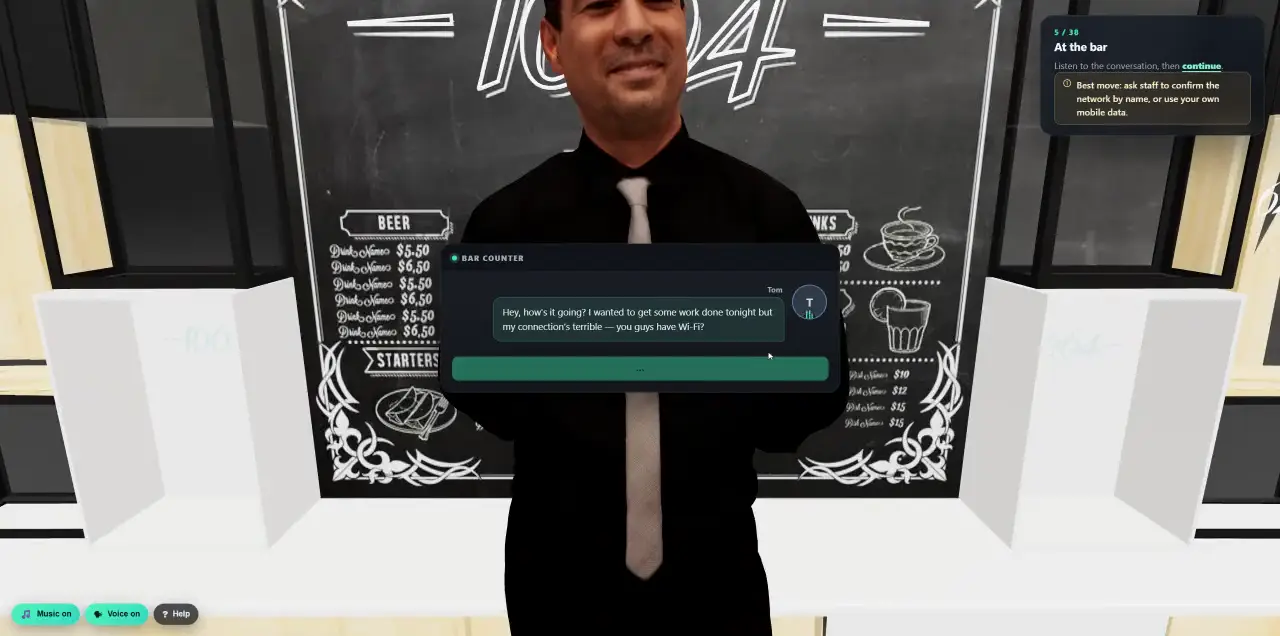
 Walk into a 3D lesson.Watch a learner go through the bar scenario, step by step.
- Cyberfrog
- Partners
Security awareness under your brand.
For MSPs, MSSPs and resellers: a 100% white-label platform. Run awareness training and attack simulations for all your customers from one console, under your own name, logo, colours and domains, with up to 40% partner discount on prices that are already among the lowest in the market.
- 100% white label
- Your own domains
- One console, every customer
- Up to 40% partner discount
One partner. Many isolated customers.
You get a partner console above your customers. Every customer keeps its own isolated workspace, with its own people, directory, sender and results, and you manage them all from one place.
- 01Separated by design
Each customer is a separate tenant, isolated in the database. Your team only enters the customers it has been granted, and every request is checked again.
- 02Your team, your roles
Owner, operator, billing and viewer. Operators run campaigns, billing sees contracts and statements, viewers see the overview without prices.
- 03Secure sign-in
Every partner sign-in asks for a second step, by authenticator app or a code by email. Invite links let each colleague set their own password.
Run every customer from one screen.
See the health of your whole portfolio, step into any customer as their admin, hand each customer its own sign-in, and build content once for all of them.
- Portfolio
- Managed customers, active learners, seats allocated, average completion and the customers that need attention, exportable as CSV.
- Customers
- Create a customer in minutes with a licence and a starter checklist and enter it with one click. Change its seats, suspend it or end it from its settings page.
- Customer logins
- Set up or reset a client’s sign-in yourself. Clients can also reset a forgotten password on their own, by an email in your brand.
- Content library
- Build your own courses, emails, videos, posters and attack templates with the same builders, then publish them to the customers you choose. Only your customers ever see them.
- Licences and team
- Seats used per customer against your pool, each customer’s licence end date, and a team page for your owners, operators and viewers.
- Alerts and reports
- Directory and sender problems, customers near their seat limit, and a daily portfolio summary by email.
100% white label. Your name, not ours.
Everything your customers and their employees see carries your brand: their admin and sign-in page, the learner portal and lessons, 3D training, every email and every report. Cyberfrog stays the technology underneath.
- Brand
- Product name, logos for light and dark backgrounds, a square mark, primary and accent colours, and the name of the AI assistant.
- Everywhere
- Customer admin, a sign-in page with your logo, learner portal and lessons, 3D training, training emails and reminders, reports and downloads, and the name in authenticator apps.
- Locked
- Your customers cannot replace your brand, and Cyberfrog’s own names can never slip in.
- Coverage
- A coverage page lists every place your brand appears, so you can check it before your customers do.
- Upload
Logo, mark and colours, checked for contrast.
- Name it
Your product, your academy, your assistant.
- Add your domains
Customer admins sign in on your branded page, at your address.
- Done
Every customer sees your brand from day one.
On your own domain, from sign-in to inbox.
Your customers sign in, learn and receive their training emails on addresses that carry your name. Add a domain, publish the DNS records the console shows you, press Verify, and it is live. Certificates are handled for you.
- Admin sign-in
- Your customers’ admins sign in at your own address, for example admin.yourcompany.com, with password, Google or Microsoft.
- Training and portal
- Training links and the learner portal on your domain, every customer under its own name, for example acme.learn.yourcompany.com.
- Email sending
- Training emails from your own domain, signed with DKIM and aligned for DMARC. The console shows the SPF, DKIM and DMARC records and checks them for you.
- Reputation guard
- Bounces are counted per sending domain. If they climb too high, sending from that domain pauses and falls back to the shared platform sender until you verify it again.
- No domain yet?
- Start on a ready-made, brand-free address for the admin and for learners, and move to your own later. Old learner links keep working for 90 days after a change.
- Checked daily
- DNS and certificates are checked every day, and your owners get an email before a certificate runs out.
Competitive for your customers, profitable for you.
Cyberfrog’s list prices are already among the lowest in the market. Partners get up to 40% on top, depending on volume and commitment, so you can price competitively and still keep a healthy margin.
- Discount
- Up to 40% off list price, on the whole platform, with every feature included.
- Contracts
- A seat pool you allocate across customers, a monthly fee per active user, or an annual flat fee.
- Demo workspaces
- Free demo and sales workspaces that never count against your seats.
- Your invoice
- We bill you; you bill your customers at your own prices. Your customers never see wholesale prices.
From application to first customer.
Apply, agree the terms, set up your brand, and your first customer campaign can go out the same week.
- Bring existing customers
Attach a customer who already uses Cyberfrog; their admin approves the move.
- Everything included
Attack simulations incl. AI calls and deepfakes, the AI Content Studio, 3D lessons, OSINT, breach response and analytics.
- A partner contact
A named contact for onboarding, sales support and your customers’ questions.
Become a Cyberfrog partner.
Tell us about your business and your customers. We reply within one business day with the partner terms and a demo workspace.
- MSPs, MSSPs, resellers and consultancies
- Any size, from your first customer
- Free demo workspaces for your sales team