
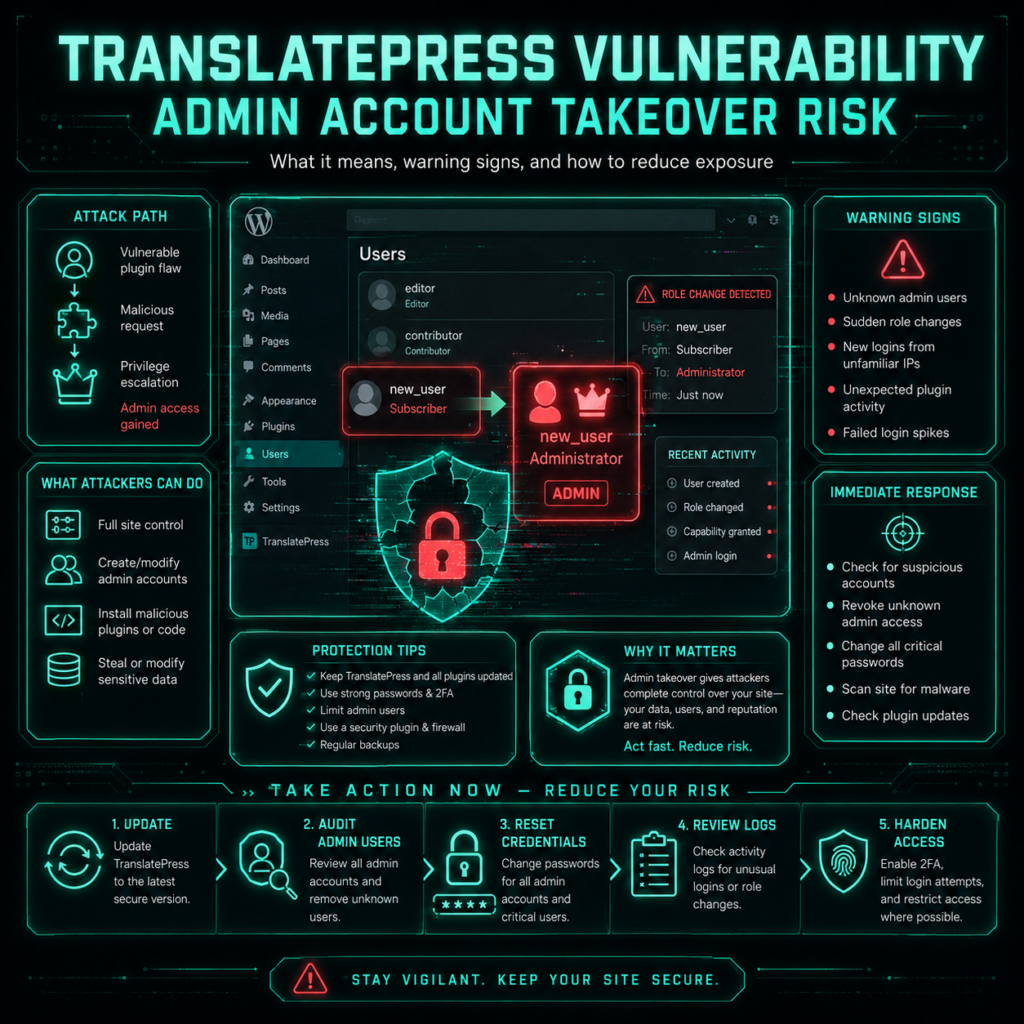
TranslatePress vulnerability disclosures are a reminder that a technical flaw can quickly become an identity and human-risk problem. A critical issue affecting the popular TranslatePress WordPress plugin can expose administrator password-reset information under specific conditions, potentially allowing an unauthenticated attacker to take over a privileged account. Wordfence reported the issue as CVE-2026-19632 and rated it 9.8 critical, while other vulnerability databases currently show different severity scoring.
The immediate priority for affected organizations is technical remediation: update TranslatePress to a patched release and investigate administrator accounts if compromise is suspected. But the incident also highlights a broader lesson for CISOs, IT teams, and security awareness managers: protecting privileged identities requires more than patching software. Employees and administrators need security behaviors that remain effective when password resets, phishing messages, exposed credentials, or social-engineering attempts are involved.
What the TranslatePress Vulnerability Does
TranslatePress is a widely deployed WordPress multilingual plugin with more than 400,000 active installations listed by WordPress.org. Its functionality includes translating website content and, under certain configurations, processing translated email content.
According to Wordfence, versions up to and including 3.3.1 were affected by an unauthenticated account-takeover vulnerability. The problem involved password-reset URLs being inadvertently stored in a secondary-language translation dictionary under particular conditions. An attacker could then retrieve the exposed information through a publicly accessible AJAX function.
The important conditions are:
- The vulnerable TranslatePress version is installed.
- Automatic string saving is enabled, which Wordfence identifies as the default configuration.
- The targeted administrator’s profile language is configured as a published secondary language.
- A password-reset URL is subsequently processed through the affected translation workflow.
When those conditions align, the password-reset URL can be exposed through the translation dictionary. Wordfence says an unauthenticated attacker who knows an administrator’s username or email address could potentially trigger a password reset, obtain the reset URL, change the password, and authenticate as the administrator.
This is particularly serious because administrator access can provide control over a WordPress site’s content, plugins, themes, users, and configuration.
The issue was fixed in TranslatePress 3.3.2. The WordPress.org listing currently shows version 3.3.3 and subsequently documented additional security fixes, making it important for administrators to verify they are running the current patched release rather than simply assuming that 3.3.2 is the latest version.
Why This Matters Beyond WordPress Patching
A vulnerability such as this sits at the intersection of application security and identity security.
The attacker does not necessarily need to persuade an employee to click a malicious email. Instead, the technical weakness can interfere with a trusted account-recovery process. Once an attacker gains access to a privileged account, however, the resulting activity can create the same types of downstream problems that security teams prepare employees to recognize in phishing and social-engineering attacks.
For example, an attacker controlling an administrator account could potentially:
- Create additional unauthorized accounts.
- Modify website content.
- Install or alter plugins and themes.
- Add malicious code.
- Access information available through the WordPress installation.
- Use the compromised website as infrastructure for further attacks.
These are potential consequences of administrator compromise, not evidence that every affected TranslatePress installation has been breached.
That distinction matters. Public reporting confirms the vulnerability and its exploitation path; it does not establish that every vulnerable site was successfully compromised.
What Security Teams Should Do Now
Organizations using TranslatePress should treat this as an application and identity-security review rather than simply a routine plugin update.
1. Verify the TranslatePress version
Check every WordPress installation for the TranslatePress plugin and confirm that it has been updated to a patched version. WordPress.org currently lists version 3.3.3 and records multiple recent security fixes.
For organizations managing many websites, this should be part of normal asset and software inventory rather than a manual, one-off exercise.
2. Review privileged accounts
Identify WordPress administrators and review:
- Recent password-reset activity
- Unexpected password changes
- New administrator accounts
- Unrecognized sessions
- Changes to plugins or themes
- Unexpected configuration changes
- Suspicious website modifications
If there is evidence of compromise, follow the organization’s incident-response process rather than treating the update alone as sufficient remediation.
3. Strengthen administrator authentication
Multi-factor authentication adds an important layer beyond passwords. Wordfence specifically recommends MFA as an additional defense because a password reset alone should not automatically provide access when a second authentication factor is required.
Organizations should also review privileged-account practices such as least privilege, unique credentials, secure password managers, and removal of unnecessary administrator access.
4. Review exposure and breach intelligence
If administrator identities or email addresses have previously appeared in breaches, credential exposure can increase the risk of targeted account attacks.
A dark web data breach detection capability can help security teams identify whether organizational credentials have appeared in known exposure datasets. However, exposure intelligence should complement—not replace—MFA, secure authentication, patch management, and employee security training.
The goal is to turn exposure information into useful risk reduction rather than simply collecting alerts.
The Human Risk Management Lesson
The TranslatePress incident also illustrates why Human Risk Management should not be reduced to annual compliance training.
Security teams need to understand how people behave when they encounter real security events: password-reset notifications, unexpected authentication prompts, requests from administrators, suspicious links, or messages claiming that an account requires immediate action.
A mature Security Awareness Platform can support this process by connecting education with measurable behavior.
Instead of asking only whether employees completed a course, security teams can examine broader signals such as:
- Phishing simulation interactions
- Reporting behavior
- Repeated difficulty with security scenarios
- Training completion
- Knowledge assessment results
- Changes in behavior over time
- Risk patterns associated with particular roles
No single metric proves that an employee is inherently “high risk.” A better approach is to identify learning opportunities and provide additional support where repeated risky behavior is observed.

Train people for the attacks they actually face.
Build stronger habits with phishing, vishing, smishing, deepfake and immersive simulations employees remember.
How Employee Security Training Can Reduce Related Risk
A technical vulnerability does not automatically become a successful breach because an employee made a mistake. Equally, employee training cannot compensate for an unpatched vulnerability.
Effective defense requires both.
Employee Security Training should prepare people to recognize the identity and social-engineering techniques that commonly surround account compromise.
Relevant training scenarios can include:
- Unexpected password-reset messages
- Fake account-security notifications
- Credential-phishing attempts
- Requests to verify administrator access
- Suspicious MFA prompts
- Social-engineering messages impersonating IT staff
- Malicious links embedded in otherwise familiar workflows
- Requests to bypass established security procedures
The most useful lesson is often simple: do not treat an unexpected authentication request as routine simply because it appears to involve a familiar service.
Employees should know where to report suspicious activity and understand that reporting a questionable message is preferable to silently dismissing it.
Phishing Simulations Should Reflect Real Account-Takeover Risks
This incident provides a practical scenario for phishing awareness training.
A controlled phishing simulation could test whether employees recognize a simulated account-security notification and use the organization’s approved verification and reporting process.
The objective should not be to embarrass people who interact with a simulation. It should create a safe learning opportunity.
A strong phishing simulation program should be:
- Authorized and controlled
- Safe for employees and production systems
- Relevant to actual organizational threats
- Clearly integrated with training
- Measured consistently
- Adapted to employee roles and previous outcomes
- Followed by useful education
A Security Awareness Platform can make this approach more effective by connecting simulated behavior with contextual learning instead of treating every employee identically.
For example, someone who repeatedly struggles with credential-phishing scenarios may benefit from targeted training about authentication and password-reset fraud, while another employee may need more practice recognizing business email compromise or malicious attachments.
Where AI-Powered Security Awareness Fits
AI can help security teams create and adapt awareness content more efficiently, but it should not be treated as a substitute for human judgment.
Cyberfrog positions its platform as an AI-Powered Security Awareness Training Platform with Phishing Simulations, combining AI-generated awareness content with realistic simulations, continuous awareness programs, and human-risk reporting. Its official site also describes simulations covering multiple channels and scenarios.
For an incident like TranslatePress, AI-assisted awareness could help transform a real vulnerability advisory into practical learning content: a short employee lesson, administrator-focused guidance, a phishing-awareness scenario, or a follow-up exercise.
Human oversight remains essential. Security teams should verify generated content for accuracy, appropriateness, privacy, organizational context, and technical correctness before deployment.
A Practical Security Awareness Response Framework
The incident can be incorporated into an organization’s broader human-risk program with a simple cycle:
- Identify the threat: Track relevant vulnerabilities, credential exposures, phishing trends, and identity attacks.
- Translate the threat into behavior: Determine what employees and administrators need to recognize or do differently.
- Train: Deliver concise, role-specific Employee Security Training.
- Simulate: Use authorized phishing or social-engineering simulations to practise the desired behavior.
- Measure: Review reporting, interaction, completion, knowledge, and repeated outcomes together.
- Adapt: Provide additional training where the evidence indicates a learning need.
- Repeat: Maintain continuous awareness rather than relying solely on an annual campaign.
This approach connects vulnerability management with Human Risk Management without confusing the two. Technical controls reduce the attack surface; security awareness helps people make safer decisions when attackers attempt to exploit identity, trust, and urgency.
The Bigger Lesson for Security Leaders
The TranslatePress vulnerability demonstrates how an unexpected data exposure can undermine a trusted account-recovery mechanism and potentially escalate into privileged-account compromise.
For WordPress administrators, the immediate lesson is straightforward: patch TranslatePress, review privileged accounts, investigate suspicious activity, and strengthen administrator authentication.
For CISOs and security awareness leaders, the lesson is broader. Human risk exists alongside technical risk, and effective security programs need both. Vulnerability management, identity protection, Employee Security Training, phishing simulations, exposure monitoring, and incident response should reinforce one another rather than operate as isolated programs.
A modern Security Awareness Platform can help organizations turn real incidents into continuous learning. The objective is not simply to make employees complete more training. It is to help people recognize credible threats, pause before taking risky actions, report suspicious activity, and build safer security habits over time.
Cyberfrog’s approach centers on that combination of AI-powered awareness content, realistic phishing and social-engineering simulations, continuous programs, and measurable human-risk insights.
The TranslatePress case is therefore more than another WordPress patching story. It is a useful reminder that protecting privileged access requires a layered strategy—secure software, strong authentication, informed employees, measurable behavior, and a security culture designed to improve continuously.
Try Cyberfrogsecurity now and strengthen your organization’s security awareness with realistic phishing simulations and continuous employee training.
Disclaimer: CyberFrogSecurity reports on publicly available threat-intelligence sources. Inclusion of an organization in an article does not imply confirmed compromise. All claims are attributed to external sources unless explicitly verified.
Make awareness training feel real.
Phishing, vishing, smishing, deepfake and 3D simulations with AI content and unified reporting.